


4.64.22M Reviews
App Specs
- Version
- Varies with Device
- Updated On
- License
- Free
- Downloads
- 10,000,000,000+
- Developer
- Meta Platforms, Inc.
- Categories
- Social
- Platform
- Android, iOS
Screenshots



 Analysis by AppCompare
I see Facebook as most useful when the people and communities you care about already use it. It can bring conversations, local groups, event plans, photos, and useful neighborhood information together, but that breadth also makes the app feel busy. I’d recommend it to someone who wants a shared social space, not to someone looking for a quiet, tightly focused feed.
Facebook is a free social app from Meta Platforms, Inc., and it has an average rating of 4.6 from around 182 million ratings. Its reach is enormous, with over 10 billion installs, but popularity alone does not make it a good fit for everyone. In my view, the key question is whether the people and groups you want to follow are active there—and whether you’re comfortable managing a feed that mixes personal updates with other content.
Where its breadth becomes genuinely useful
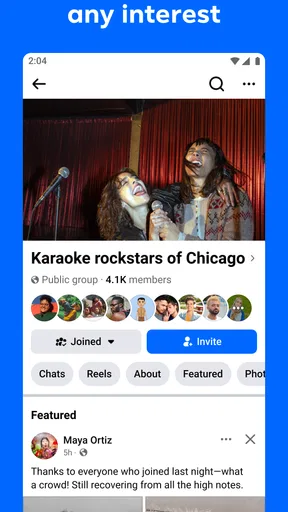
The clearest strength is that Facebook can serve very different purposes without requiring you to join a separate service for each one. A family member might use it to share photos, a hobby group might organize discussions, and a local community might post about events or items for sale. That makes it especially handy when your social circle is spread across different ages and interests.
Guides and Analysis on Facebook
Groups are worth approaching as communities rather than just another stream of posts. If you join one for a specific hobby, neighborhood, or practical interest, take a moment to read its rules and observe how members use it before posting. That small step can help you judge whether the group offers useful conversation or mostly repeats announcements. It also makes the app more manageable: following a few focused groups can be more rewarding than trying to keep up with every possible topic.
Events offer another practical use. I’d use them to keep track of a gathering or community activity when the people involved already coordinate there, rather than assuming the app will replace every calendar or invitation tool. The useful part is having the event discussion and the people attending in one place. The trade-off is that you still need to check details and notifications yourself; a social event page is not the same as a personal schedule that you control.
Marketplace can also be useful when you want to browse local listings or pass along something you no longer need. I’d treat it as a way to discover possible options, not as a guarantee that a listing is accurate or that a transaction will go smoothly. Before agreeing to buy or sell, clarify the item’s condition, price, and pickup arrangements directly with the other person. That is sensible anywhere strangers arrange local exchanges, and it matters more than the convenience of finding a listing quickly.
A realistic day-to-day way to use it
Picture checking Facebook over breakfast to see a relative’s photo, then returning later to read a post in a neighborhood group about a local activity. You might respond to the post, check the event discussion, and send a message to someone involved. That is the app at its best: several small interactions that would otherwise be scattered across conversations and community pages, gathered around people you already know or interests you recognize.
Worth Reading Before You Choose

Baby Panda World Brings Quick Play to Modern Phones, but Its Game Library Feels Busy

ESPN’s Live Game View Makes Following Close Games Easier

QuizzLand Review: A Good Fit for Short Trivia Breaks, Not Every Player

Basketball Stars: Multiplayer Is Fast, but Can It Recover When Matches Go Wrong?

WEBTOON Turns Phone Updates Into a Better Reading Routine

Link to Windows Runs on Shared Habits, Not Social Feeds
It can also be useful for someone who helps manage a club or informal community. A group can give members a familiar place to share updates and ask questions, while an event can keep discussion connected to a specific gathering. I would still keep important information somewhere members can reliably find it, especially if not everyone checks social feeds regularly. A post can be easy to miss among other updates, so Facebook works better as a participation space than as the only record of essential plans.
For a less cluttered routine, I’d be selective about what I follow and use the available audience controls before sharing personal updates. Consider the intended audience each time: a post meant for close friends may not belong in a public or broad community space. Stories can suit a casual moment you do not want to leave on your timeline indefinitely, while a lasting update deserves a slower check of its audience and wording. These choices take a little attention, but they make the experience feel more deliberate.
How it compares with other social apps
Compared with a messaging app, Facebook is better suited to posts, groups, and community activity than to a simple private conversation. Messenger integration can make it convenient to move from browsing to chatting, but if your main need is reliable one-to-one communication, a dedicated messaging app may feel clearer and less distracting. You do not need to use Facebook for every kind of contact just because a chat option is nearby.
Compared with a photo-first or short-video social app, Facebook’s appeal is its mixture of formats and relationships. It can be a better match when you want family updates, local discussions, and hobby groups in the same place. The cost of that range is a less focused experience: someone opening the app only to watch a particular kind of video or share polished visual posts may prefer a service built around that activity. I would choose based on the people and content I actually want, not on the assumption that one network must replace all the others.
It also differs from a dedicated local marketplace or event-planning service. Facebook can make it easy to discover a listing or see who is discussing an event, but a specialized service may offer a more focused process for completing a transaction or organizing plans. If those tasks are your only reason to install it, compare the workflow before relying on Facebook. Its advantage is that the people and discussion may already be there; its limitation is that the broader feed can surround a practical task with plenty of unrelated material.
Keeping the feed useful without letting it take over
The app’s range can be a strength, but it can also turn a quick check into an extended scroll. I find it helps to open Facebook with a purpose: check a group, answer a message, or look for a particular update. If the feed starts to feel noisy, review which people and groups you follow and remove sources that no longer add value. That is more effective than expecting a broad social app to stay focused on its own.
Ads are another visible part of the experience, and their presence can interrupt the sense of a personal feed. Since Facebook is free to use, advertising is part of the trade-off I notice as a user. If you strongly dislike sponsored material or want a calmer reading experience, that alone may be reason to spend less time in the app or choose a more focused alternative. The convenience of having many communities in one place does not erase the friction of seeing commercial content alongside updates from people you know.
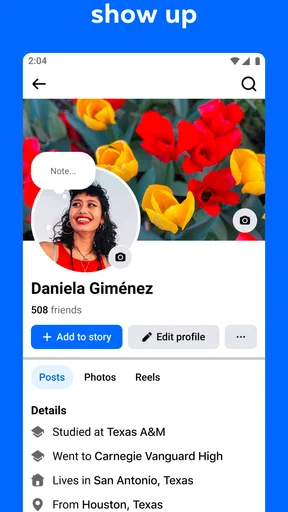
Privacy deserves ongoing attention rather than a one-time setup. Before sharing something personal, I’d check the audience selector and review the account’s privacy settings so I understand who can see posts and profile details. It is also worth being cautious about what you share in a group: being a member does not automatically mean every post is appropriate for a broad audience. Facebook gives users controls, but those controls only help when you take time to use them thoughtfully.
The app is rated Teen, so I would not treat its social space as automatically suitable for every age or every family situation. A younger user may need guidance about audiences, group participation, and what information to share. Adults can benefit from the same habits. The practical question is not only whether someone can open the app, but whether they know how to handle social interactions and personal information there.
Who I’d recommend it to—and who may prefer something else
I’d recommend Facebook to people whose relatives, friends, clubs, or local communities already use it. It is particularly worthwhile if you want to participate in several kinds of social activity and are willing to curate your feed. Someone organizing a hobby group, keeping up with extended family, or checking community posts may get more from it than someone who only wants a clean, chronological stream of updates.
I would be more hesitant to recommend it to someone who is trying to reduce screen time, avoid advertising, or keep personal and community activity in separate apps. Its many possible uses can encourage repeated checking, and a full feed can make important updates harder to spot. If you only need private chats, use a messaging service; if you mainly want a specialized content feed, choose a service designed around that content. Facebook makes most sense when its particular mix is the reason you want it.
The app is free, though it offers in-app purchases ranging from a few cents to $10,000 per item. I would not assume that a purchase is necessary for ordinary social use; decide based on what you are actually trying to do and review any purchase carefully before confirming it. That is especially sensible if a device is shared or used by someone younger. Keeping the app free to download does not mean every optional transaction should be treated casually.
The Social Hub
First off, if you're looking to keep up with friends, family, and that random guy from high school, Facebook is still your go-to. It's like a one-stop-shop for all your social needs. You can post updates, share photos, and even jump into a live video if you're feeling bold. And let’s not forget about those groups and events. Whether you're into knitting or extreme fishing, there's a community waiting for you. Just last week, I found a group dedicated to gourmet popcorn. Who knew?
Features and Functions
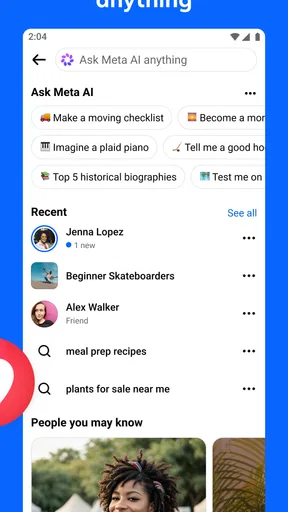
Now, let's talk about the features. Facebook has everything from Marketplace for buying and selling stuff locally to Facebook Watch, where you can binge on videos. The app is like a Swiss Army knife of social media. Messenger integration means you can chat without leaving the app, which is super convenient. I mean, who wants to switch back and forth between apps just to send a meme?
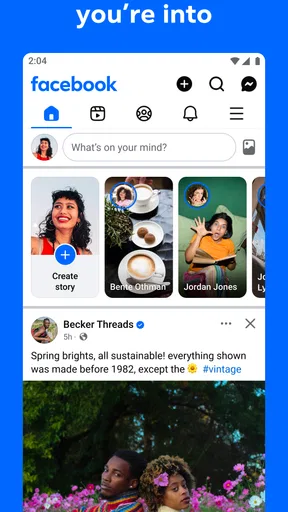
And the Stories feature? It's a quick way to share your day with everyone without clogging up your timeline. Plus, if you're like me and love a good filter, there are plenty to choose from. Just remember, those stories disappear after 24 hours, so keep it snappy!
Privacy Concerns
Okay, let's get real for a second. Privacy is a biggie with Facebook. They've had their share of controversies, and it's something to keep in mind. The app has made strides in giving users more control over their data, but it's always a good idea to check your settings. Make sure you're comfortable with who can see your posts and what information you're sharing. Better safe than sorry, right?
Usability and Design
As for usability, the app is pretty intuitive. The design is sleek and user-friendly, although sometimes it can feel a bit cluttered, especially with all the ads. But hey, that's the trade-off for a free platform. Navigation is straightforward, and everything is just a tap away.
One thing I appreciate is how fast the app loads. No one likes to wait around, and Facebook gets that. Whether you’re on Wi-Fi or mobile data, it’s quick to open and start scrolling through updates.
Final Thoughts
So, is Facebook worth your time? If you're looking to stay connected, entertained, and maybe even a little informed, then absolutely. It's a social media giant for a reason. Just keep those privacy settings in check and enjoy the ride. Whether you're a casual user or a hardcore Facebooker, there's something here for everyone. Happy scrolling!
Pros
- User-friendly interface for easy navigation.
- Highly customizable privacy settings.
- Seamless integration with Instagram.
- Wide range of community groups available.
- Efficient event management tools.
Cons
- Frequent notifications can be overwhelming.
- Algorithm changes affect post visibility.
- Privacy concerns over data usage.
- Heavy app size can slow down devices.
- Sponsored content can clutter feeds.
FAQs for Facebook
What features does the Facebook app offer?
The Facebook app provides a wide range of features including the ability to connect with friends, share updates, photos, and videos, join groups, and participate in events. It also offers Messenger integration for chatting, Marketplace for buying and selling items, and a news feed to stay updated on what's happening with friends and in the world.
Is the Facebook app free to use?
Yes, the Facebook app is free to download and use on both Android and iOS devices. However, it does require an internet connection, and users may incur data charges depending on their mobile plan. Some features, such as in-app purchases within games or ads, may involve additional costs.
How does Facebook handle user privacy and data security?
Facebook has implemented various privacy settings allowing users to control who sees their information and content. They use encryption and other security measures to protect user data. However, given past controversies over data breaches and privacy issues, users should regularly review and update their privacy settings to ensure they are comfortable with the information they are sharing.
Can I use Facebook without creating an account?
No, to fully use the Facebook app, you need to create an account. This involves providing some personal information, such as your name, email, or phone number. Without an account, you cannot interact with other users, post updates, or access the app’s full range of features.
What should I do if the Facebook app isn’t working properly?
If you're experiencing issues with the Facebook app, try restarting your device, ensuring your app is updated to the latest version, and checking your internet connection. If problems persist, visit the Facebook Help Center for troubleshooting tips or consider reinstalling the app to resolve any persistent glitches.


